From Feature Announcement to 62% Adoption — How we redesigned onboarding to unlock the Powerups
Users weren't activating the WhatsApp Powerup—even when they saw it. We discovered why and redesigned the entire onboarding flow to fix it.
Impact
Shipped and launched after 3 weeks in 2020 to 500,000+ Gini users across Asia. Increased WhatsApp Powerup activation from 40% to 62% (+55%). Sustained 78% engagement at 30 days with 2+ notifications per week.
Company
Gini
Duration
3 weeks
Team
1 PM, 1 designer, 1 engineer
Scope
Redesign the WhatsApp Powerup onboarding flow and validate with research
About Gini
Gini is a major expense tracker in Asia, serving 500K+ users with 20-30 employees since 2016. Winners of FinTech Awards, Gini constantly pushes new features to help users manage their finances.
Problem
In the original onboarding, Gini users were shown a new feature: smart financial notifications via WhatsApp. But 40% of new signups who saw the feature never actually activated it.
Through user interviews with 8 recent signups, I discovered two critical issues:
Unclear value — Users didn't understand why they should enable WhatsApp notifications
Missing confirmation — Users didn't know if they'd successfully completed the setup
This feature was valuable for users who activated it, but the current onboarding wasn't compelling enough to drive adoption.
Discovery
I conducted 8 user interviews with recent Gini signups to understand the problem.
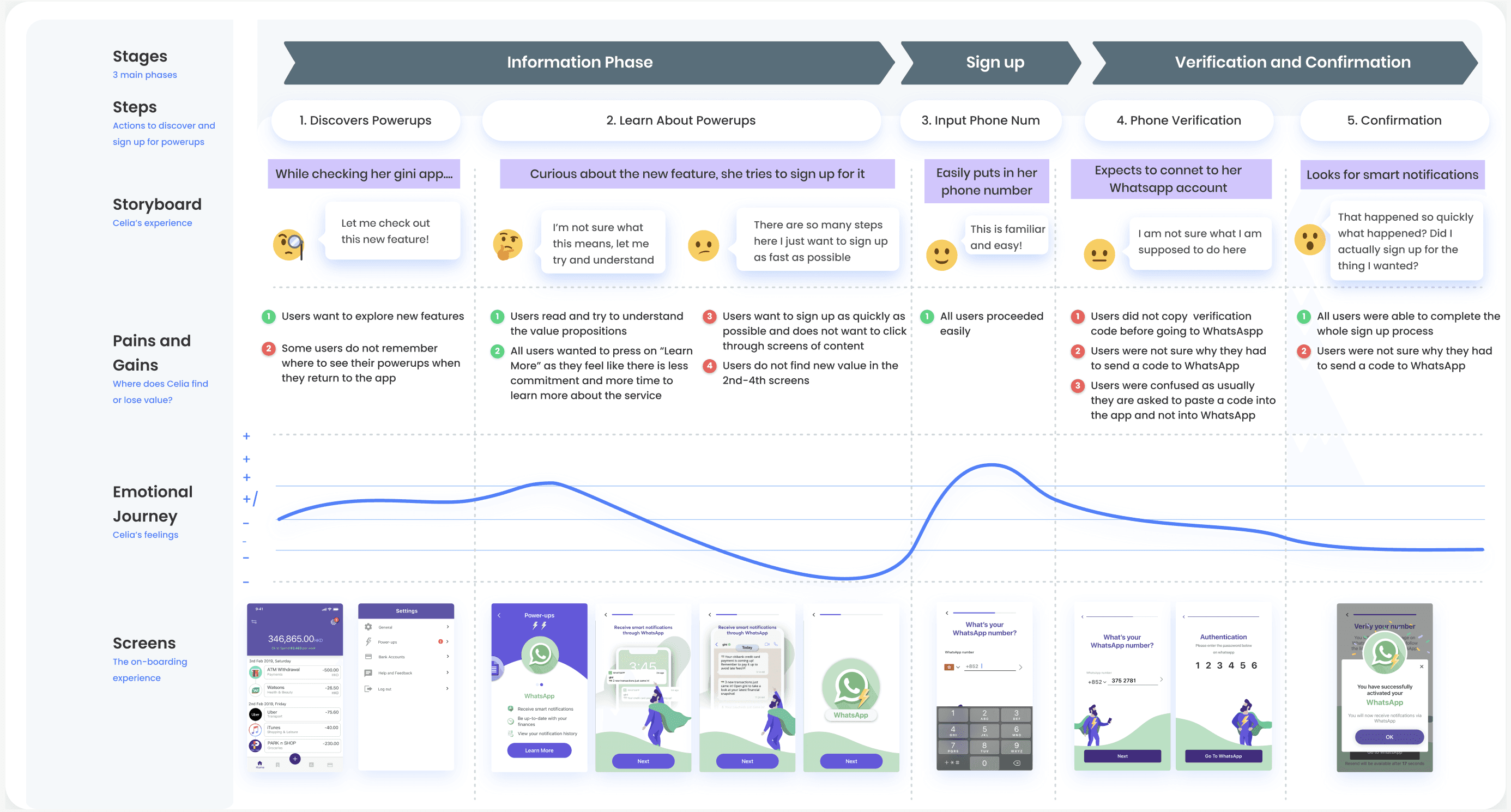
Key Findings:
7 of 8 users actually read the value prop but did not understand the value of the product
4 of 8 users saw the onboarding screen but skipped it (banner blindness) - Those who tried the feature didn't understand the next step (WhatsApp connection felt disconnected from the app)
Post-setup, 5 of 8 users weren't sure if it actually worked (no confirmation state)
The insight: The value proposition isn't clear to users to entice them to sign up.
How might we onboard users to new features in a way that is quick, informative, and leaves them feeling confident about what they signed up for?
Approach
Shifting from feature explanation to benefit story: that users want to stay updated on their finances without opening the app constantly — and can will not miss important notifications from Gini
Design strategy:
Lead with the benefit, not the feature
Use illustration to build emotional connection
Break the flow into smaller, discrete steps (info → enablement → confirmation)
Add a direct path to WhatsApp (reducing friction)
Confirm success visually (so users feel assured)
The insight: The value proposition isn't clear to users to entice them to sign up.
How might we onboard users to new features in a way that is quick, informative, and leaves them feeling confident about what they signed up for?
Solution
Step 1: Simplified & Jargon-Free Hook
Illustration with clear, benefit-focused messaging
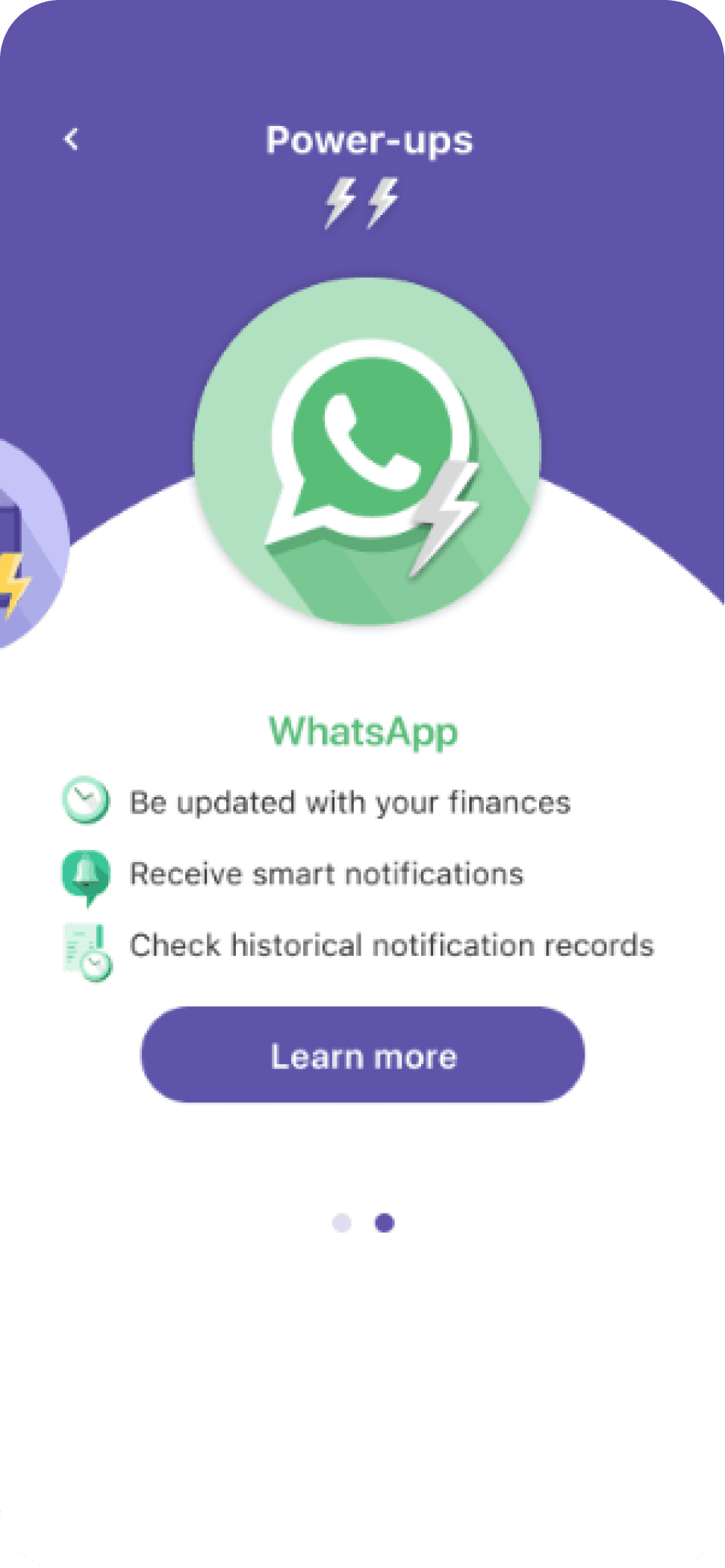
Before
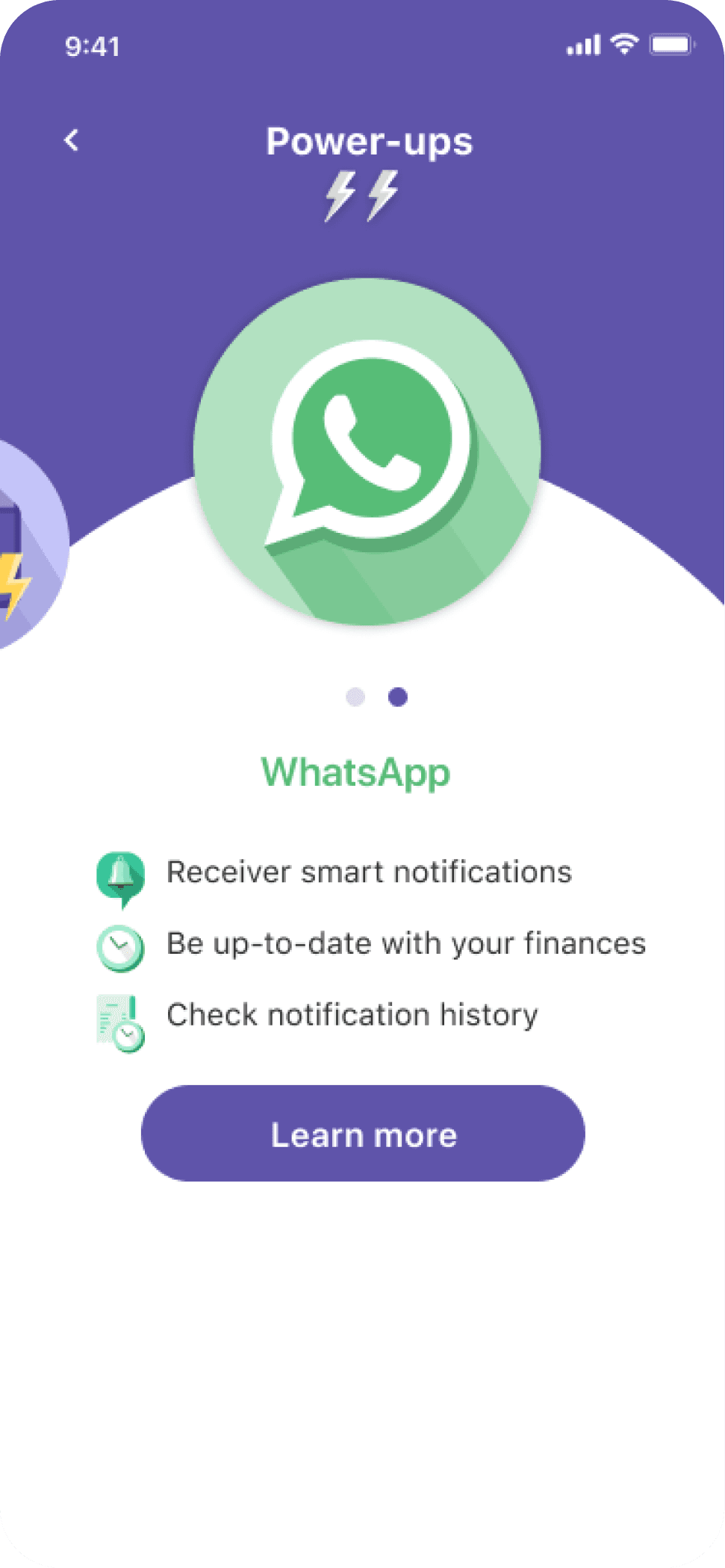
After
I stripped away unnecessary visual elements (like the power-up icon overlay on the WhatsApp icon) that added confusion without adding value. Instead, I focused on:
Clear benefit: "Receive smart notifications"
Common language: Changed "historical notification" to "notification history" (more intuitive for users)
Friendly tone: Illustration makes it relatable without technical jargon
Why this works: Users need a quick and easy way to understand why they should click the "learn more" button. By clarifying the benefits of Whatsapp notifications and not just push notifications, the value proposition is improved.
Step 2: Progressive Learning Path
Optional animation short + Skip button
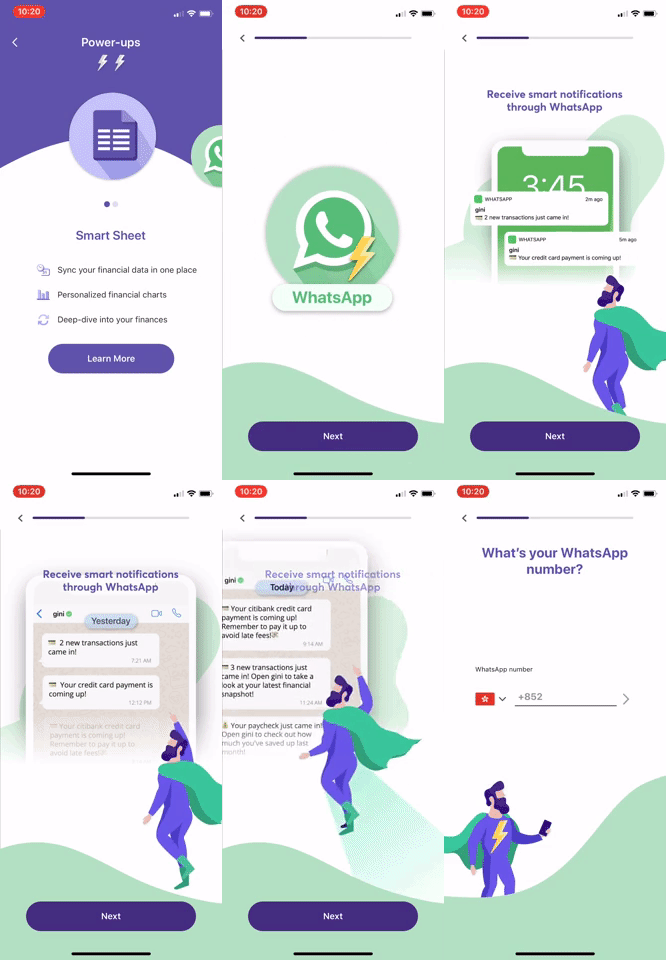
Before
After
Replaced the click-thorugh as an animated short. Animation is more engaging than forced clickthrough—users choose to watch because it's interesting, not mandatory. This was also completely optional, users can press "next" at any point to skip through.
Why this works: One-size-fits-all onboarding fails because users have different needs. Some need reassurance through storytelling. Others just want to enable and move on. By giving them both paths, we accommodated both user types.
Step 3: Confirmation Screen (Proof of Completion)
This was critical. In testing the original flow, users completed the sign-up but didn't feel like they'd completed it. They'd ask: "Did it work? Is it actually on?" Users also did not immediately see any Whatsapp notification as proof/example of it working.
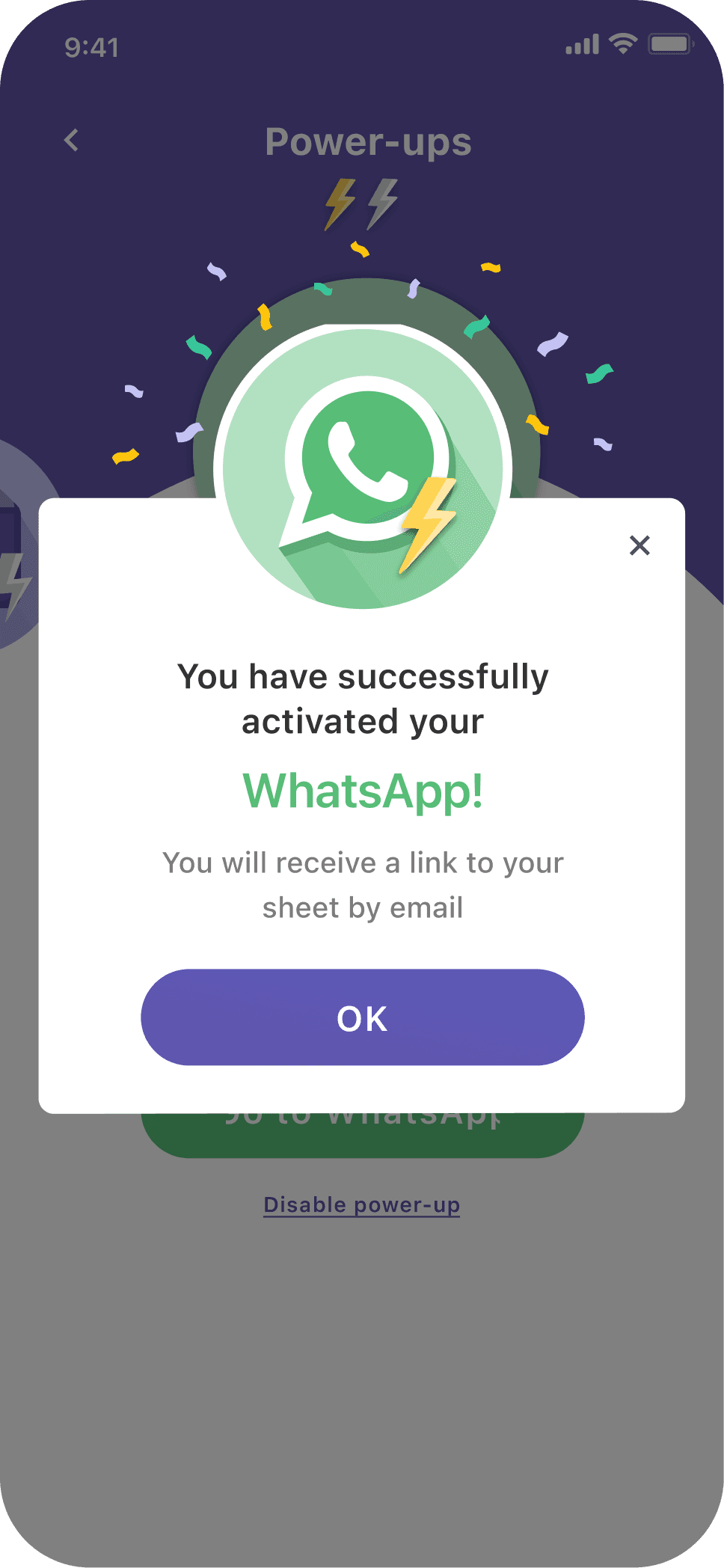
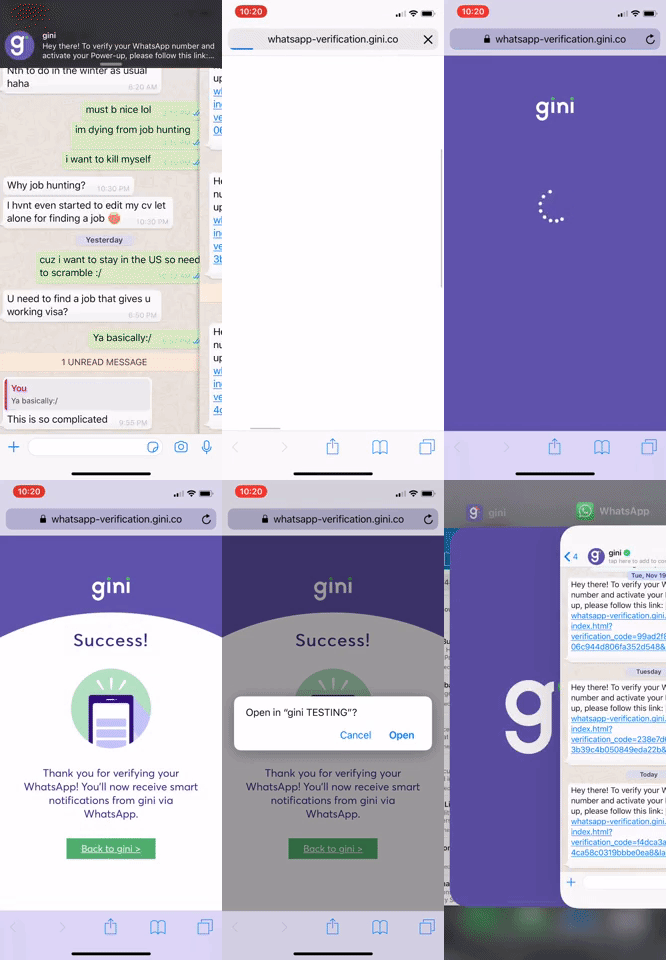
I added multiple points of confirmation:
At the iframe level — when users finished with consenting to connect Whatsapp with Gini
At the app level — confirmation pop-up, and the learn more button becomes "go to Whatsapp" to show completion
Within Whatsapp — users get a Whatsapp notification
Why this works: Users needed tangible proof, not just a "success" message. By showing the feature actually working (real data, real notifications), we eliminated doubt.
Impact
This streamlined approach solved both problems from our research:
Clarity: Users understood what they were getting (no jargon confusion)
Speed: Users could enable it in 30 seconds if they wanted, or learn more if they preferred
Follow-up testing showed 4 of 4 users completed the setup and 4 of 4 felt confident they knew what they were enabling—a massive improvement from the original 2/4 completion rate.
Learnings
Fast is not always better
UX content iterations need validation through testing
User comprehension for financial products could be challenging
" transform="translate(7.619 7.37)" width="9.89946px"/><path d="M 0 8.485 L 0 0" fill="transparent" height="8.485330000000001px" id="u3F5BT_W_" stroke-dasharray="" stroke-linecap="round" stroke-linejoin="round" stroke-width="1.5" stroke="rgb(0, 0, 0)" transform="translate(17.519 7.37)" width="1px"/><path d="M 0 0 L 8.485 0" fill="transparent" height="1px" id="WuExV3vAI" stroke-dasharray="" stroke-linecap="round" stroke-linejoin="round" stroke-width="1.5" stroke="rgb(0, 0, 0)" transform="translate(9.033 7.37)" width="8.485299999999999px"/></g></svg>)